Apr 15, 2023

Pyspark Joins

data1_cols = ["id","name"]

data1 = [(1, "Sugreeva"), (2, "Ravan"), (4, "Hanuman"), (4, "Hanuman"), (2, "Ravan")]

data1_df = spark.createDataFrame(data = data1, schema = data1_cols)

data1_df.show(truncate=False)

+---+--------+
| id| name|
+---+--------+
| 1|Sugreeva|
| 2| Ravan|
| 4| Hanuman|
| 4| Hanuman|
| 2| Ravan|
+---+--------+

data2_cols = ["id","name"]

data2 = [(2, "Ravan"), (2, "Ravan"), (1, "Sugreeva"), (6, "Ram"), (7, "Sita"), (7, "Sita")]

data2_df = spark.createDataFrame(data = data2, schema = data2_cols)

data2_df.show(truncate=False)

+---+--------+
| id| name|
+---+--------+
| 2| Ravan|
| 2| Ravan|
| 1|Sugreeva|
| 6| Ram|
| 7| Sita|
| 7| Sita|
+---+--------+

#inner (M*N if any duplicates)

data1_df.join(data2_df, on=[data1_df.id == data2_df.id], how="inner").show(truncate=False)

+---+--------+---+--------+
|id |name |id |name |
+---+--------+---+--------+
|1 |Sugreeva|1 |Sugreeva|
|2 |Ravan |2 |Ravan |
|2 |Ravan |2 |Ravan |
|2 |Ravan |2 |Ravan |
|2 |Ravan |2 |Ravan |
+---+--------+---+--------+
#left join (M*N if any duplicates)

data1_df.join(data2_df, on=[data1_df.id == data2_df.id], how="left").show(truncate=False)

+---+--------+----+--------+
|id |name |id |name |
+---+--------+----+--------+
|1 |Sugreeva|1 |Sugreeva|
|2 |Ravan |2 |Ravan |
|2 |Ravan |2 |Ravan |
|2 |Ravan |2 |Ravan |
|2 |Ravan |2 |Ravan |
|4 |Hanuman |null|null |
|4 |Hanuman |null|null |
+---+--------+----+--------+

#right join (M*N if any duplicates)

data1_df.join(data2_df, on=[data1_df.id == data2_df.id], how="right").show(truncate=False)

+----+--------+---+--------+
|id |name |id |name |
+----+--------+---+--------+
|null|null |7 |Sita |
|null|null |7 |Sita |
|null|null |6 |Ram |
|1 |Sugreeva|1 |Sugreeva|
|2 |Ravan |2 |Ravan |
|2 |Ravan |2 |Ravan |
|2 |Ravan |2 |Ravan |
|2 |Ravan |2 |Ravan |
+----+--------+---+--------+

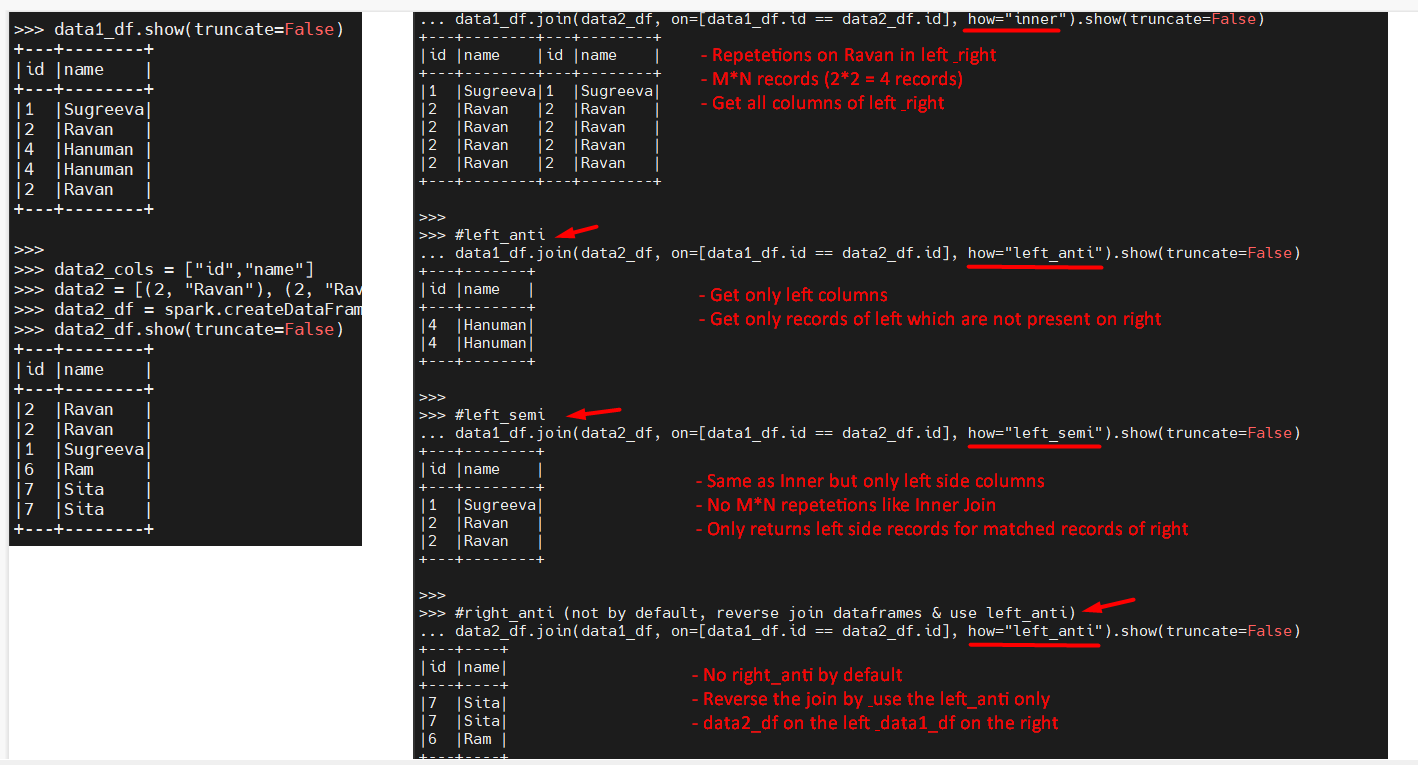
#left_anti

data1_df.join(data2_df, on=[data1_df.id == data2_df.id], how="left_anti").show(truncate=False)

+---+-------+
|id |name |
+---+-------+
|4 |Hanuman|
|4 |Hanuman|
+---+-------+

#left_semi

data1_df.join(data2_df, on=[data1_df.id == data2_df.id], how="left_semi").show(truncate=False)

+---+--------+
|id |name |
+---+--------+
|1 |Sugreeva|
|2 |Ravan |
|2 |Ravan |
+---+--------+

#right_anti (not by default, reverse join dataframes & use left_anti)

data2_df.join(data1_df, on=[data1_df.id == data2_df.id], how="left_anti").show(truncate=False)

+---+----+
|id |name|
+---+----+
|7 |Sita|
|7 |Sita|
|6 |Ram |
+---+----+


Apr 5, 2023

pyspark join condition (2 types)

 columns1 = ["emp_id","emp_name","emp_city","emp_salary"]

data1 = [
(1, "John", "Sydney", 35000.00),
(2, "Peter", "Melbourne", 45000.00),
(3, "Sam", "Sydney", 55000.00)]
emp_df = spark.createDataFrame(data = data1, schema = columns1)
emp_df.show(truncate=False)
emp_df.printSchema()

data2 = [
(2, "Peter", "Melbourne", 55000.00),
(5, "Jessie", "Brisbane", 42000.00)]
emp_delta_df = spark.createDataFrame(data = data2, schema = columns1)
emp_delta_df.show(truncate=False)
emp_delta_df.printSchema()

# emp_id from emp_delta_df not shown
print('### emp_id from emp_delta_df not shown')
emp_df.join(emp_delta_df, "emp_id", "inner").show()

# emp_id is shown from both dataframes
print('### emp_id is repeated from both dataframes')
emp_df.join(emp_delta_df, emp_df.emp_id == emp_delta_df.emp_id, "inner").show()
### emp_id from emp_delta_df not shown
+------+--------+---------+----------+--------+---------+----------+
|emp_id|emp_name| emp_city|emp_salary|emp_name| emp_city|emp_salary|
+------+--------+---------+----------+--------+---------+----------+
|     2|   Peter|Melbourne|   45000.0|   Peter|Melbourne|   55000.0|
+------+--------+---------+----------+--------+---------+----------+

### emp_id is repeated from both dataframes
+------+--------+---------+----------+------+--------+---------+----------+
|emp_id|emp_name| emp_city|emp_salary|emp_id|emp_name| emp_city|emp_salary|
+------+--------+---------+----------+------+--------+---------+----------+
|     2|   Peter|Melbourne|   45000.0|     2|   Peter|Melbourne|   55000.0|
+------+--------+---------+----------+------+--------+---------+----------+

pyspark scd type2 with delta file

 from pyspark.sql.functions import *

from pyspark.sql import SparkSession
spark = SparkSession.builder.master('local')\
.appName('scdType2')\
.getOrCreate()
emp_df = spark.read.csv('C:\\Users\\Prabhath\\Downloads\\employee.csv', inferSchema=True, header=True,
ignoreLeadingWhiteSpace=True, ignoreTrailingWhiteSpace=True)
emp_df = emp_df.alias('emp_df')
emp_df.show()

emp_delta_df = spark.read.csv('C:\\Users\\Prabhath\\Downloads\\employee_delta.csv', inferSchema=True, header=True,
ignoreLeadingWhiteSpace=True, ignoreTrailingWhiteSpace=True)
emp_delta_df = emp_delta_df.alias('emp_delta_df')
emp_delta_df.show()

#in-active
emp_inactive = emp_df.join(emp_delta_df, emp_df.emp_id==emp_delta_df.emp_id, "inner")\
.select("emp_df.*")\
.withColumn('is_active', lit(False))\
.withColumn('start_time', current_timestamp())\
.withColumn('end_time', current_timestamp())
print('### inactive records - common in both - emp_df depreated, so take only those')
emp_inactive.show(truncate=False)

#active
emp_active = emp_df.join(emp_delta_df, emp_df.emp_id==emp_delta_df.emp_id, "inner")\
.select("emp_delta_df.*")\
.withColumn('is_active', lit(True))\
.withColumn('start_time', current_timestamp())\
.withColumn('end_time', to_timestamp(lit('9999-12-31 00:00:00.000'), 'yyyy-MM-dd HH:mm:ss.SSSS'))
print('### active records - common in both - emp_delta_df latest, so take only those')
emp_active.show(truncate=False)

#only left (no
emp_no_change_df = emp_df.join(emp_delta_df, emp_df.emp_id==emp_delta_df.emp_id, "left_anti")\
.select("emp_df.*")\
.withColumn('is_active', lit(True))\
.withColumn('start_time', current_timestamp())\
.withColumn('end_time', to_timestamp(lit('9999-12-31 00:00:00.000'), 'yyyy-MM-dd HH:mm:ss.SSSS'))
print('### not changed records - left anti - emp_df join emp_delta_df')
emp_no_change_df.show(truncate=False)


#only right (new)
emp_new_df = emp_delta_df.join(emp_df, emp_df.emp_id==emp_delta_df.emp_id, "left_anti")\
.select("emp_delta_df.*")\
.withColumn('is_active', lit(True))\
.withColumn('start_time', current_timestamp())\
.withColumn('end_time', to_timestamp(lit('9999-12-31 00:00:00.000'), 'yyyy-MM-dd HH:mm:ss.SSSS'))
print('### new records - left anti - emp_delta_df join emp_df')
emp_new_df.show(truncate=False)

#union all
final_df = emp_inactive.union(emp_active).union(emp_no_change_df).union(emp_new_df).orderBy('emp_id', 'is_active')
final_df.show(truncate=False)


+------+--------+---------+----------+
|emp_id|emp_name| emp_city|emp_salary|
+------+--------+---------+----------+
|     1|    John|   Sydney|     35000|
|     2|   Peter|Melbourne|     45000|
|     3|     Sam|   Sydeny|     55000|
+------+--------+---------+----------+

+------+--------+---------+----------+
|emp_id|emp_name| emp_city|emp_salary|
+------+--------+---------+----------+
|     2|   Peter|Melbourne|     55000|
|     4|     Sam|   Sydeny|     42000|
+------+--------+---------+----------+

### inactive records - common in both - emp_df depreated, so take only those
+------+--------+---------+----------+---------+-----------------------+-----------------------+
|emp_id|emp_name|emp_city |emp_salary|is_active|start_time             |end_time               |
+------+--------+---------+----------+---------+-----------------------+-----------------------+
|2     |Peter   |Melbourne|45000     |false    |2023-04-05 21:28:26.006|2023-04-05 21:28:26.006|
+------+--------+---------+----------+---------+-----------------------+-----------------------+

### active records - common in both - emp_delta_df latest, so take only those
+------+--------+---------+----------+---------+----------------------+-------------------+
|emp_id|emp_name|emp_city |emp_salary|is_active|start_time            |end_time           |
+------+--------+---------+----------+---------+----------------------+-------------------+
|2     |Peter   |Melbourne|55000     |true     |2023-04-05 21:28:26.36|9999-12-31 00:00:00|
+------+--------+---------+----------+---------+----------------------+-------------------+

### not changed records - left anti - emp_df join emp_delta_df
+------+--------+--------+----------+---------+-----------------------+-------------------+
|emp_id|emp_name|emp_city|emp_salary|is_active|start_time             |end_time           |
+------+--------+--------+----------+---------+-----------------------+-------------------+
|1     |John    |Sydney  |35000     |true     |2023-04-05 21:28:26.586|9999-12-31 00:00:00|
|3     |Sam     |Sydeny  |55000     |true     |2023-04-05 21:28:26.586|9999-12-31 00:00:00|
+------+--------+--------+----------+---------+-----------------------+-------------------+

### new records - left anti - emp_delta_df join emp_df
+------+--------+--------+----------+---------+-----------------------+-------------------+
|emp_id|emp_name|emp_city|emp_salary|is_active|start_time             |end_time           |
+------+--------+--------+----------+---------+-----------------------+-------------------+
|4     |Sam     |Sydeny  |42000     |true     |2023-04-05 21:28:26.781|9999-12-31 00:00:00|
+------+--------+--------+----------+---------+-----------------------+-------------------+

### union all (inactive, active, not_changed, changed)
+------+--------+---------+----------+---------+-----------------------+-----------------------+ |emp_id|emp_name|emp_city |emp_salary|is_active|start_time |end_time | +------+--------+---------+----------+---------+-----------------------+-----------------------+ |1 |John |Sydney |35000 |true |2023-04-05 21:28:26.956|9999-12-31 00:00:00 | |2 |Peter |Melbourne|45000 |false |2023-04-05 21:28:26.956|2023-04-05 21:28:26.956| |2 |Peter |Melbourne|55000 |true |2023-04-05 21:28:26.956|9999-12-31 00:00:00 | |3 |Sam |Sydeny |55000 |true |2023-04-05 21:28:26.956|9999-12-31 00:00:00 | |4 |Sam |Sydeny |42000 |true |2023-04-05 21:28:26.956|9999-12-31 00:00:00 | +------+--------+---------+----------+---------+-----------------------+-----------------------+


Apr 18, 2022

sed examples

Ref: https://www.geeksforgeeks.org/sed-command-in-linux-unix-with-examples/

sed 's/unix/linux/' test.txt   # Replacing or substituting string (sed command replaces the first occurrence of the pattern in each line and it)

sed 's/unix/linux/2' test.txt  # Replacing the nth occurrence of a pattern in a line

sed 's/unix/linux/g' test.txt  # Replace all occurances in a line as well

sed 's/unix/linux/3g' test.txt # Replace nth till last (3rd, 4th, 5th etc.,)

echo "Welcome To The Geek Stuff" | sed 's/\(\b[A-Z]\)/\(\1\)/g'

sed '3 s/unix/linux/' test.txt # restrict the sed command to replace the string on a specific line number.

sed 's/unix/linux/p' test.txt  # The /p print flag prints the replaced line twice on the terminal. If a line does not have the search pattern and is not replaced, then the /p prints that line only once.

sed -n 's/unix/linux/p' test.txt # print only replaced lines, n option suppresses the duplicate rows generated by the /p flag and prints the replaced lines only one time.

sed '1,3 s/unix/linux/' test.txt # Replace range of lines

sed '5d' test1.txt  # delete 5th line

sed '$d' test1.txt  # delete last line

sed '3,6d' test1.txt # delete from range x to y

sed '12,$d' test1.txt # delete from nth line till last

sed '/abc/d' test1.txt # delete line which matches pattern


# Replace & update same file (-i means --in-place)
sed -i 's/ABC/ABCDEF/g' sed_test.txt

# Replace & update same file (-i means --in-place), -ibak takes original file as backup (sed_test.txtbak)
sed -ibak 's/ABC/ABCDEF/g' sed_test.txt


Oct 7, 2021

mysqlimport from text file

# Import multiple txt files into MySQL DB 

# Table name is txt file name (no need to mention)


# We will be using /data as the reference directory

#sudo mkdir -p /data

#sudo su - root

cd /data

#git clone https://github.com/dgadiraju/nyse_all.git

#gunzip /data/nyse_all/nyse_data/


# Each file soft link to stock_eod.txt

# stock_eod acts as Table Name

for f in /home/cloudera/data/nyse/nyse_all-master/nyse_data/*.txt

do

  echo '------------'

  echo $f

  sudo unlink stock_eod.txt

  sudo ln -s $f stock_eod.txt

  sudo mysqlimport \

    --host=127.0.0.1 \

    --user=root \

    --password=cloudera \

    --fields-terminated-by=',' \

    --lines-terminated-by='\n' \

    --local \

    --lock-tables \

    --verbose \

    nyse stock_eod.txt


echo "Done: '"$f"' at $(date)"

done


Sep 13, 2021

bigdata, hdfs

  • Hdfs commands
    • hadoop fs -ls <>
    • hadoop fs -mkdir <>
    • hadoop fs -rmdir <>
    • Copy file from Edge Node to HDFS
      • hadoop fs -put /home/cloudera/<src> /user/cloudera/<dest> 
    • Read file rom HDFS
      • hadoop fs -cat /user/cloudera/<file_path>
  • hadoop dfsadmin -safemode leave
✓ -R : Recursively list the contents of directories.
    ✓ -C : Display the paths of files and directories only.
      By default it sorts in ascending order by name.
        ✓ ls –r : Reverse the order of the sort.
          ✓ ls –S : Sort files by size.
            ✓ ls –t : Sort files by modification time (most recent first).

                ✓ Command : rmdir
                  • Remove Directory if it is empty.
                    • --ignore-fail-on-non-empty : Suppress Error messages if the Folder you are trying to remove is non empty.
                      ✓ Command : rm
                        • rm remove files.
                          • With option –r , recursively deletes directories
                            • With option –skipTrash bypasses trash, if enabled.
                              • With option –f, no error message even if file does not exist. Check with Unix command $?. It returns the status of
                                last ran job. 0 means successful and 1 means not successful.
                                  ✓ Command: mkdir
                                    • Create Directory
                                      • –p : Do not fail if the directory already exists. Also we can create multiple folders recursively.

                                          HDFS to Local
                                            ###########
                                              ✓ Command - copyToLocal or get
                                                hadoop fs -get practice/retail_db/orders .
                                                  ✓ Error if the destination path already exists. To overwrite use –f flag.
                                                    hadoop fs -get practice/retail_db/orders .
                                                      hadoop fs -get –f practice/retail_db/orders .
                                                        ✓ -p flag to preserves access and modification times, ownership and the mode.
                                                          hadoop fs -get -p practice/retail_db/orders .
                                                            ✓ To Only copy the files with out folder use a pattern.
                                                              hadoop fs -get practice/retail_db/orders/* .
                                                                ✓ When copying multiple files, the destination must be a directory.
                                                                  mkdir copyHere
                                                                    hadoop fs -get practice/retail_db/orders/* practice/sample.txt copyHere

                                                                        Local to HDFS
                                                                          ######
                                                                            ✓ Command - copyFromLocal or put
                                                                              hadoop fs -mkdir –p practice/retail_db
                                                                                hadoop fs -put dataFiles/* practice/retail_db/
                                                                                  hadoop fs -mkdir –p practice/retail_db1
                                                                                    hadoop fs -put dataFiles practice/retail_db1/ #Creates a subfolder dataFiles under retail_db
                                                                                      ✓ Error if the destination path already exists. To overwrite use –f flag.
                                                                                        hadoop fs -put -f dataFiles/* practice/retail_db/
                                                                                          ✓ -p flag to Preserves timestamps, ownership and the mode.
                                                                                            hadoop fs -put -p dataFiles/* practice/retail_db/
                                                                                              ✓ We can also copy multiple files.
                                                                                                hadoop fs -put -f dataFiles/* sample.txt practice/retail_db/

                                                                                                    ✓ First 10
                                                                                                      hadoop fs -cat practice/retail_db/orders/part-00000 | head -10
                                                                                                        ✓ Last 10
                                                                                                          hadoop fs -cat practice/retail_db/orders/part-00000 | tail -10

                                                                                                              Statistics
                                                                                                                #########
                                                                                                                  ✓ Command – stat


                                                                                                                    • Print statistics related to any file/directory
                                                                                                                      ✓ default or %y - Modification Time
                                                                                                                        hdfs dfs -stat %y <hdfs_file_name>

                                                                                                                        ✓ %b - File Size in Bytes
                                                                                                                          hdfs dfs -stat %b <hdfs_file_name>

                                                                                                                          ✓ %F - Type of object.
                                                                                                                            ✓ %o - Block Size
                                                                                                                              ✓ %r - Replication
                                                                                                                                ✓ %u - User Name
                                                                                                                                  ✓ %a - File Permission in Octal
                                                                                                                                    ✓ %A - File Permission in Symbolic

                                                                                                                                        storage details in HDFS
                                                                                                                                          ##############
                                                                                                                                            ✓ Command – df
                                                                                                                                              • Shows the capacity, free and used space of the HDFS file system.
                                                                                                                                                • hadoop fs -df
                                                                                                                                                  • -h →Readable Format
                                                                                                                                                    ✓ Command – du
                                                                                                                                                      • Show the amount of space, in bytes, used by the files that match the specified file pattern.
                                                                                                                                                        • hadoop fs -du practice/retail_db
                                                                                                                                                          • -h :Readable Format
                                                                                                                                                            • -v : Displays with Header
                                                                                                                                                              • -s : Summary of total size

                                                                                                                                                                  File Metadata
                                                                                                                                                                    ########
                                                                                                                                                                      ✓ Command – fsck
                                                                                                                                                                        ✓ Even if a Size of a file has less than 128MB , it will still occupy 1 Block.
                                                                                                                                                                          ✓ Help: hadoop fsck –help

                                                                                                                                                                              ### Print the fsck High Level Report
                                                                                                                                                                                hadoop fsck practice/retail_db

                                                                                                                                                                                    ### -files → Print a detailed file level report.
                                                                                                                                                                                      hadoop fsck practice/retail_db –files

                                                                                                                                                                                          ### -files -blocks →Print a detailed file and block report.
                                                                                                                                                                                            hadoop fsck practice/retail_db –files -blocks

                                                                                                                                                                                                ### -files -blocks -locations → Print out locations for every block
                                                                                                                                                                                                  hadoop fsck practice/retail_db –files –blocks –locations

                                                                                                                                                                                                      ### -files -blocks -racks → Print out network topology for data-node locations


                                                                                                                                                                                                            Properties update (-D)


                                                                                                                                                                                                            Aug 4, 2021

                                                                                                                                                                                                            How to handle carriage return

                                                                                                                                                                                                            Vim - view in binary mode

                                                                                                                                                                                                            file rest.py

                                                                                                                                                                                                            # rest.py: Python script, ASCII text executable, with very long lines, with CRLF line terminators

                                                                                                                                                                                                            vim -b rest.py  # to  view ^M characters


                                                                                                                                                                                                            Solution

                                                                                                                                                                                                            1) dos2unix rest.py

                                                                                                                                                                                                            2) Alternate to dos2unix

                                                                                                                                                                                                            sed -i -e "s/\r//g" `cat /tmp/file_changes.txt`

                                                                                                                                                                                                            -i: in-place

                                                                                                                                                                                                            -e: regular expression

                                                                                                                                                                                                            \r: escaped carriage return

                                                                                                                                                                                                            /g: replace globally


                                                                                                                                                                                                            Git

                                                                                                                                                                                                            • vim .git/config
                                                                                                                                                                                                              • [core]
                                                                                                                                                                                                                • autocrlf = true
                                                                                                                                                                                                                • filemode = false
                                                                                                                                                                                                            • git diff --ignore-space-at-eol > /tmp/complete_diff.txt


                                                                                                                                                                                                            Jun 25, 2021

                                                                                                                                                                                                            Python3 write to file using Print

                                                                                                                                                                                                            New version

                                                                                                                                                                                                            with open(f'output.csv', 'w') as f:

                                                                                                                                                                                                                  print(data, file=f)


                                                                                                                                                                                                            Old version

                                                                                                                                                                                                            with open(f'output.csv', 'w') as f:

                                                                                                                                                                                                                  f.write(data)

                                                                                                                                                                                                            Python3 fstrings

                                                                                                                                                                                                            vars = 'abc'

                                                                                                                                                                                                            print(f 'Variable  is : {vars}')

                                                                                                                                                                                                            This is much better than 'Variable is : {}'.format(vars)

                                                                                                                                                                                                            Jun 20, 2021

                                                                                                                                                                                                            How to change the MySQL root account password on CentOS7?


                                                                                                                                                                                                            1. Stop mysql:

                                                                                                                                                                                                            systemctl stop mysqld


                                                                                                                                                                                                            2. Set the mySQL environment option 

                                                                                                                                                                                                            systemctl set-environment MYSQLD_OPTS="--skip-grant-tables"


                                                                                                                                                                                                            3. Start mysql usig the options you just set

                                                                                                                                                                                                            systemctl start mysqld


                                                                                                                                                                                                            4. Login as root

                                                                                                                                                                                                            mysql -u root


                                                                                                                                                                                                            5. Update the root user password with these mysql commands

                                                                                                                                                                                                            mysql> UPDATE mysql.user SET authentication_string = PASSWORD('MyNewPassword') WHERE User = 'root' AND Host = 'localhost';

                                                                                                                                                                                                            mysql> FLUSH PRIVILEGES;


                                                                                                                                                                                                            for 5.7.6 and later, you should use 

                                                                                                                                                                                                            mysql> ALTER USER 'root'@'localhost' IDENTIFIED BY 'MyNewPass';

                                                                                                                                                                                                            mysql> quit


                                                                                                                                                                                                            6. Stop mysql

                                                                                                                                                                                                            systemctl stop mysqld


                                                                                                                                                                                                            7. Unset the mySQL envitroment option so it starts normally next time

                                                                                                                                                                                                            systemctl unset-environment MYSQLD_OPTS


                                                                                                                                                                                                            8. Start mysql normally:

                                                                                                                                                                                                            systemctl start mysqld


                                                                                                                                                                                                            Try to login using your new password:

                                                                                                                                                                                                            7. mysql -u root -p


                                                                                                                                                                                                            Jun 19, 2021

                                                                                                                                                                                                            EC2 - Permission denied (publickey,gssapi-keyex,gssapi-with-mic).

                                                                                                                                                                                                            • EC2 login Issue
                                                                                                                                                                                                              • ssh -i /root/stage.pem root@ec2-54-<>.compute-1.amazonaws.com
                                                                                                                                                                                                            • ERROR
                                                                                                                                                                                                              • EC2 - Permission denied (publickey,gssapi-keyex,gssapi-with-mic).
                                                                                                                                                                                                            • Reason
                                                                                                                                                                                                              • There is a chance PEM file not added to ~/.ssh/authorized_keys 
                                                                                                                                                                                                            Solution
                                                                                                                                                                                                            • Go to EC2 Dashbaord
                                                                                                                                                                                                            • Click on Connect (EC2 Instance Connect)


                                                                                                                                                                                                            • Open ~/.ssh/authorized_keys
                                                                                                                                                                                                            • Add the entry
                                                                                                                                                                                                              • ssh-rsa AAAAB3NzaC1yc2EAAAA<....>nJXw== Staging
                                                                                                                                                                                                            • Try to SSH again
                                                                                                                                                                                                            • Done

                                                                                                                                                                                                            systemctl chkconfig - Enable/Disable service on boot


                                                                                                                                                                                                            chkconfig --list httpd

                                                                                                                                                                                                            chkconfig --list varnish

                                                                                                                                                                                                            (or)

                                                                                                                                                                                                            systemctl list-unit-files | grep httpd

                                                                                                                                                                                                            systemctl list-unit-files | grep varnish


                                                                                                                                                                                                            systemctl is-active httpd

                                                                                                                                                                                                            systemctl is-active varnish


                                                                                                                                                                                                            Enable on boot

                                                                                                                                                                                                            • chkconfig httpd on

                                                                                                                                                                                                            Disable on boot

                                                                                                                                                                                                            • chkconfig httpd off

                                                                                                                                                                                                            Jun 18, 2021

                                                                                                                                                                                                            Find Unix Distribution Version

                                                                                                                                                                                                            • cat /proc/version
                                                                                                                                                                                                              • Linux version 4.14.219-164.354.amzn2.x86_64 (mockbuild@ip-10-0-1-103) (gcc version 7.3.1 20180712 (Red Hat 7.3.1-12) (GCC)) #1 SMP Mon Feb 22 21:18:39 UTC 2021 
                                                                                                                                                                                                            • rpm -E %{rhel}
                                                                                                                                                                                                              • 7

                                                                                                                                                                                                            Jun 3, 2021

                                                                                                                                                                                                            Python Array Vs List

                                                                                                                                                                                                             Python Array Vs List

                                                                                                                                                                                                            ListArray
                                                                                                                                                                                                            Heterigenous elements
                                                                                                                                                                                                            E.g, [1, 2, [3, 4], 5, 6]
                                                                                                                                                                                                            Homogenous elements
                                                                                                                                                                                                            numbers = array.array('i', [1, 2, 3])
                                                                                                                                                                                                            Explicitly define type of elements while defining (i - means integers
                                                                                                                                                                                                            Use lot more spaceUse less spcace compared lists
                                                                                                                                                                                                            List contains pointers to different objectsLike C language arrays, with a pointer pointing to first element & rest are allocated in continuous memory
                                                                                                                                                                                                            More flexible keeping different structures of dataLess flexible
                                                                                                                                                                                                            Less efficient in storing & manipulatingMore efficient in storing & manipulating
                                                                                                                                                                                                            Used when your collection grow & shrink in time efficient manner & manage lot of data types in a listUsed when you perform lot of computationally intensive math operations
                                                                                                                                                                                                            Numpy arrays are more suited for mathematical operations


                                                                                                                                                                                                            Python Arrays

                                                                                                                                                                                                            Arrays are sequence of homogeneous elements

                                                                                                                                                                                                            import array

                                                                                                                                                                                                            numbers = array.array('i', [1, 2, 3])

                                                                                                                                                                                                            numbers.append(4)
                                                                                                                                                                                                            print(numbers) # array('i', [1, 2, 3, 4])

                                                                                                                                                                                                            # extend() appends iterable to the end of the array
                                                                                                                                                                                                            numbers.extend([5, 6, 7])
                                                                                                                                                                                                            print(numbers) # array('i', [1, 2, 3, 4, 5, 6, 7])


                                                                                                                                                                                                            Apr 14, 2021

                                                                                                                                                                                                            git merge reset merge

                                                                                                                                                                                                            • git fetch && git checkout master
                                                                                                                                                                                                            • # You want to pull master to your branch
                                                                                                                                                                                                              • git checkout branch1 (from master)
                                                                                                                                                                                                            • git merge master (or git pull origin master)
                                                                                                                                                                                                              • CONFLICT (content): Merge conflict in site/test.py
                                                                                                                                                                                                              • --- say some conflicts & u want to move to master / branch2

                                                                                                                                                                                                              • git checkout master
                                                                                                                                                                                                                • ----> error: you need to resolve your current index first
                                                                                                                                                                                                              • git branch ## branch1
                                                                                                                                                                                                              • git reset --merge
                                                                                                                                                                                                              • git checkout master # will work

                                                                                                                                                                                                              Apr 3, 2021

                                                                                                                                                                                                              How to evaluate time taken for urls using curl

                                                                                                                                                                                                              • Configure ~/.curlrc
                                                                                                                                                                                                                • Add file ~/.curlrc & add the below
                                                                                                                                                                                                                • -w "dnslookup: %{time_namelookup} | connect: %{time_connect} | appconnect: %{time_appconnect} | pretransfer: %{time_pretransfer} | starttransfer: %{time_starttransfer} | total: %{time_total} | size: %{size_download}\n"
                                                                                                                                                                                                              •  How to call urls using Curl?
                                                                                                                                                                                                                • curl -so /dev/null "https://www.site.com/test/video.mp4"
                                                                                                                                                                                                                  • dnslookup: 0.013 | connect: 0.335 | appconnect: 1.090 | pretransfer: 1.090 | starttransfer: 1.666 | total: 24.770 | size: 128750670
                                                                                                                                                                                                                • curl -so /dev/null "https://cdn.site.com/test/video.mp4"
                                                                                                                                                                                                                  • dnslookup: 0.013 | connect: 0.051 | appconnect: 0.311 | pretransfer: 0.311 | starttransfer: 1.287 | total: 11.556 | size: 128750670

                                                                                                                                                                                                              We can observe 2nd url (CDN) takes almost half the time as the first once.


                                                                                                                                                                                                              Oct 15, 2020

                                                                                                                                                                                                              Python lamdba filter


                                                                                                                                                                                                              result_dict = {
                                                                                                                                                                                                              1: {'site': u'test1.com', 'site_name': u'test1', 'is_https': True},
                                                                                                                                                                                                              2: {'site': u'test2.com', 'site_name': u'test2', 'is_https': False}
                                                                                                                                                                                                              }
                                                                                                                                                                                                              print('-' * 30)
                                                                                                                                                                                                              print(result_dict)

                                                                                                                                                                                                              print('-' * 30)
                                                                                                                                                                                                              https_list = dict(filter(lambda x: x if x[1]['is_https'] else None, result_dict.items()))
                                                                                                                                                                                                              non_https_list = dict(filter(lambda x: x if not x[1]['is_https'] else None, result_dict.items()))

                                                                                                                                                                                                              print(https_list)
                                                                                                                                                                                                              print('-' * 30)
                                                                                                                                                                                                              print(non_https_list)

                                                                                                                                                                                                              Output:
                                                                                                                                                                                                              ------------------------------
                                                                                                                                                                                                              {1: {'site_name': u'test1', 'site': u'test1.com', 'is_https': True}, 
                                                                                                                                                                                                              2: {'site_name': u'test2', 'site': u'test2.com', 'is_https': False}}
                                                                                                                                                                                                              ------------------------------
                                                                                                                                                                                                              {1: {'site_name': u'test1', 'site': u'test1.com', 'is_https': True}}
                                                                                                                                                                                                              ------------------------------
                                                                                                                                                                                                              {2: {'site_name': u'test2', 'site': u'test2.com', 'is_https': False}}

                                                                                                                                                                                                              Jun 23, 2020

                                                                                                                                                                                                              DB Tools


                                                                                                                                                                                                              • dbeaver (FOSS - Free and Open Source S/W)
                                                                                                                                                                                                              • DB Visualizer (Free Tier - Only Read Operations)
                                                                                                                                                                                                              • PopSQL

                                                                                                                                                                                                              Jun 18, 2020

                                                                                                                                                                                                              Supervisor in Linux

                                                                                                                                                                                                              • Supervisor is a client/server system that allows its users to monitor and control a number of processes on UNIX-like operating systems.
                                                                                                                                                                                                              • Start like any other program at boot time.
                                                                                                                                                                                                              • If process gets killed, it brings up the program on its own.

                                                                                                                                                                                                              Tried these in CentOS (RedHat)

                                                                                                                                                                                                              How to install
                                                                                                                                                                                                              yum -y install supervisor

                                                                                                                                                                                                              How to Start/Restart/Stop/Status
                                                                                                                                                                                                              systemctl start supervisord
                                                                                                                                                                                                              systemctl enable supervisord
                                                                                                                                                                                                              systemctl status supervisord

                                                                                                                                                                                                              /etc/supervisord.d/test.ini

                                                                                                                                                                                                              [group:test]
                                                                                                                                                                                                              programs=test1, test2

                                                                                                                                                                                                              [program:test1]
                                                                                                                                                                                                              command=python -u test1.py
                                                                                                                                                                                                              directory=/opt/site
                                                                                                                                                                                                              stdout_logfile=/tmp/prabhath.log
                                                                                                                                                                                                              redirect_stderr=true

                                                                                                                                                                                                              [program:test2]
                                                                                                                                                                                                              command=python -u test2.py
                                                                                                                                                                                                              directory=/opt/site
                                                                                                                                                                                                              stdout_logfile=/tmp/prabhath.log
                                                                                                                                                                                                              redirect_stderr=true

                                                                                                                                                                                                              How to restart Group
                                                                                                                                                                                                              supervisorctl restart test:*


                                                                                                                                                                                                              /opt/site/test1.py
                                                                                                                                                                                                              import time
                                                                                                                                                                                                              while True:
                                                                                                                                                                                                                  print('inside Test1')
                                                                                                                                                                                                                  time.sleep(1)


                                                                                                                                                                                                              /opt/site/test2.py
                                                                                                                                                                                                              import time
                                                                                                                                                                                                              while True:
                                                                                                                                                                                                                  print('inside Test2')
                                                                                                                                                                                                                  time.sleep(2)


                                                                                                                                                                                                              Jun 16, 2020

                                                                                                                                                                                                              How to keep terminal alive


                                                                                                                                                                                                              To prevent connection loss, instruct the ssh client to send a sign-of-life signal to the server once in a while. Add the following to ~/.ssh/config

                                                                                                                                                                                                              vim ~/.ssh/config

                                                                                                                                                                                                              Host *
                                                                                                                                                                                                                ServerAliveInterval 120