May 13, 2023

Pyspark SaveAsTable Vs InsertInto


insertInto

saveAsTable

Table must exist before writing

Not required to exist

It ignores column names, it goes by position based approach

column based resolution

It requires schema of the dataframe should be same as schema of table

Append mode: It requires schema of the dataframe should be same as schema of table

Overwrite mode: Same schema is not required

Overwrite mode: will truncate the table & inserts the data

Overwrite mode: will drop table, re-create table & then insert data

Does not support BucketBy

Support BucketBy

If table is partitioned, partitionBy should not be used

If table is partitioned, partitionBy must be used


Example (Overwrite an existing partition)

Here we are only trying to update/overwrite 'category' column for US records only (don't overwrite other country records i.e., IN/PL/BH/UK)


from pyspark.sql.functions import *


#need to set, else we get error as below:

#org.apache.spark.SparkException: Dynamic partition strict mode requires at least one static partition column.

spark.conf.set("hive.exec.dynamic.partition.mode", "nonstrict")


### txnrecords_part_all is partitioned table with country as partitioned column

df1=spark.sql("select * from test.txnrecords_part_all")

df1.groupBy('country').agg(count('country')).show(truncate=False)


#Select only records from US (as we want to update US records only) -> partitioned by country

df1=spark.sql("select * from test.txnrecords_part_all where country='US'")


#updating category column

df1 = df1.withColumn('category', concat(col('category'), lit('111')))

df1.show(truncate=False)


#insertInto

#Table must exist before writing

#It ignores column names, it goes by position

#Does not support Bucketing

#If table is partitioned, you should not use partitionBy

df1.write.mode("overwrite").insertInto("test.txnrecords_part_all", overwrite=True)


#saveAsTable

#Table not required to exist before writing - table is not present txnrecords_part_all_sat

#column based approach (not by position)

#It support Bucketing

#If table is already partitioned, so you must use partitionBy

#companiesDF.write.mode("overwrite").partitionBy("country").saveAsTable(targetTable)

#df1.write.mode("overwrite").partitionBy("country").saveAsTable("test.txnrecords_part_all_sat")


Before

#####

hive> select * from txnrecords_part_all where country='US' limit 5;

OK

0       06-26-2011      4007024 40.33   Exercise & Fitness      Cardio Machine Accessories      Clarksville     Tennessee       credit  S       US

1       05-26-2011      4006742 198.44  Exercise & Fitness      Weightlifting Gloves    Long Beach      California      credit  S       US

2       06-01-2011      4009775 5.58    Exercise & Fitness      Weightlifting Machine Accessories       Anaheim California      credit  S       US

3       06-05-2011      4002199 198.19  Gymnastics      Gymnastics Rings        Milwaukee       Wisconsin       credit  S       US

4       12-17-2011      4002613 98.81   Team Sports     Field Hockey    Nashville       Tennessee       credit  S       US

Time taken: 1.023 seconds, Fetched: 5 row(s)

hive> select * from txnrecords_part_all where country='UK' limit 5;

OK

0       06-26-2011      4007024 40.33   Exercise & Fitness      Cardio Machine Accessories      Clarksville     Tennessee       credit  K       UK

1       05-26-2011      4006742 198.44  Exercise & Fitness      Weightlifting Gloves    Long Beach      California      credit  K       UK

2       06-01-2011      4009775 5.58    Exercise & Fitness      Weightlifting Machine Accessories       Anaheim California      credit  K       UK

3       06-05-2011      4002199 198.19  Gymnastics      Gymnastics Rings        Milwaukee       Wisconsin       credit  K       UK

4       12-17-2011      4002613 98.81   Team Sports     Field Hockey    Nashville       Tennessee       credit  K       UK

Time taken: 0.174 seconds, Fetched: 5 row(s)


After

#####

You observe only US partition records got updated as above (111), not UK partition records as below

hive> select * from txnrecords_part_all where country='US' limit 5;

OK

0       06-26-2011      4007024 40.33   Exercise & Fitness111   Cardio Machine Accessories      Clarksville     Tennessee       credit  S       US

1       05-26-2011      4006742 198.44  Exercise & Fitness111   Weightlifting Gloves    Long Beach      California      credit  S       US

2       06-01-2011      4009775 5.58    Exercise & Fitness111   Weightlifting Machine Accessories       Anaheim California      credit  S       US

3       06-05-2011      4002199 198.19  Gymnastics111   Gymnastics Rings        Milwaukee       Wisconsin       credit  S       US

4       12-17-2011      4002613 98.81   Team Sports111  Field Hockey    Nashville       Tennessee       credit  S       US

Time taken: 0.2 seconds, Fetched: 5 row(s)


hive> select * from txnrecords_part_all where country='UK' limit 5;

OK

0       06-26-2011      4007024 40.33   Exercise & Fitness      Cardio Machine Accessories      Clarksville     Tennessee       credit  K       UK

1       05-26-2011      4006742 198.44  Exercise & Fitness      Weightlifting Gloves    Long Beach      California      credit  K       UK

2       06-01-2011      4009775 5.58    Exercise & Fitness      Weightlifting Machine Accessories       Anaheim California      credit  K       UK

3       06-05-2011      4002199 198.19  Gymnastics      Gymnastics Rings        Milwaukee       Wisconsin       credit  K       UK

4       12-17-2011      4002613 98.81   Team Sports     Field Hockey    Nashville       Tennessee       credit  K       UK

Time taken: 0.168 seconds, Fetched: 5 row(s)


Apr 18, 2023

Pyspark - How to Find the consecutive values in PySpark DataFrame column and replace the value

#Pyspark - How to Find the consecutive values in PySpark DataFrame column and replace the value

from pyspark.sql.functions import *
from pyspark.sql.window import Window
from pyspark.sql import SparkSession
spark = SparkSession.builder.master(
'local')\
.appName(
'scdType2')\
.getOrCreate()
data1 = [
(
1, 'ABC'),
(
2, 'ABC'),
(
3, 'ABC'),
(
4, 'XYZ'),
(
5, 'PQR'),
(
6, 'PQR')
]
columns1 = [
'id', 'dept']

dataDF = spark.createDataFrame(
data=data1, schema=columns1)
dataDF.show()
winSpec = Window.partitionBy(
'dept').orderBy('id')

dataDF.withColumn(
'row_num', row_number().over(winSpec))\
.withColumn(
'result', col("dept"))\
.show(
truncate=False)

# +---+----+-------+------+
# |id |dept|row_num|result|
# +---+----+-------+------+
# |5 |PQR |1 |PQR |
# |6 |PQR |2 |PQR |
# |4 |XYZ |1 |XYZ |
# |1 |ABC |1 |ABC |
# |2 |ABC |2 |ABC |
# |3 |ABC |3 |ABC |
# +---+----+-------+------+


dataDF.withColumn('row_num', row_number().over(winSpec))\
.withColumn(
'result', when((col("row_num") > 1), concat_ws('_', "dept", "row_num")).otherwise(col("dept")))\
.show(
truncate=False)

# +---+----+-------+------+
# |id |dept|row_num|result|
# +---+----+-------+------+
# |5 |PQR |1 |PQR |
# |6 |PQR |2 |PQR_2 |
# |4 |XYZ |1 |XYZ |
# |1 |ABC |1 |ABC |
# |2 |ABC |2 |ABC_2 |
# |3 |ABC |3 |ABC_3 |
# +---+----+-------+------+

#But we supposed to get output as below
# We only have to add _1/_2 when duplicate is there
# use lag/lead to find out duplicate present
# +---+----+-------+------+
# |id |dept|row_num|result|
# +---+----+-------+------+
# |5 |PQR |1 |PQR_1 |
# |6 |PQR |2 |PQR_2 |
# |4 |XYZ |1 |XYZ |
# |1 |ABC |1 |ABC_1 |
# |2 |ABC |2 |ABC_2 |
# |3 |ABC |3 |ABC_3 |
# +---+----+-------+------+

wind_id = Window.orderBy('id')
wind_by_dept = Window.partitionBy(
"dept").orderBy("dept")
condition = col(
"chk_duplicate")| ((col("chk_length")>1) & (col("row_num")==1))

new_df = dataDF.withColumn(
"chk_duplicate",col("dept")==lag("dept").over(wind_id))\
.withColumn(
"row_num",row_number().over(wind_by_dept))\
.withColumn(
"chk_length",count("dept").over(wind_by_dept))\
.withColumn(
"dept_updated",when(condition,concat_ws("_", *["dept","row_num"]))
.otherwise(col(
"dept")))

new_df.orderBy(
"id").show()
# +---+----+-------------+-------+----------+------------+
# | id|dept|chk_duplicate|row_num|chk_length|dept_updated|
# +---+----+-------------+-------+----------+------------+
# | 1| ABC| null| 1| 3| ABC_1|
# | 2| ABC| true| 2| 3| ABC_2|
# | 3| ABC| true| 3| 3| ABC_3|
# | 4| XYZ| false| 1| 1| XYZ|
# | 5| PQR| false| 1| 2| PQR_1|
# | 6| PQR| true| 2| 2| PQR_2|
# +---+----+-------------+-------+----------+------------+

#*dataDF.columns, dept_updated - having issue - keep wild card later
#only named arguments may follow *expression
#new_df.select(*dataDF.columns, 'dept_updated').orderBy("id").show()
new_df.select('dept_updated', *dataDF.columns).orderBy("id").show()

# +------------+---+----+
# |dept_updated| id|dept|
# +------------+---+----+
# | ABC_1| 1| ABC|
# | ABC_2| 2| ABC|
# | ABC_3| 3| ABC|
# | XYZ| 4| XYZ|
# | PQR_1| 5| PQR|
# | PQR_2| 6| PQR|
# +------------+---+----+

#or
new_df.select('id', 'dept', 'dept_updated').orderBy("id").show()
# +---+----+------------+
# | id|dept|dept_updated|
# +---+----+------------+
# | 1| ABC| ABC_1|
# | 2| ABC| ABC_2|
# | 3| ABC| ABC_3|
# | 4| XYZ| XYZ|
# | 5| PQR| PQR_1|
# | 6| PQR| PQR_2|
# +---+----+------------+


Pyspark - join & keep right dataframe data

 #Pyspark - join & keep right dataframe data


from pyspark.sql.functions import *
from pyspark.sql import SparkSession
spark = SparkSession.builder.master('local')\
.appName('scdType2')\
.getOrCreate()

data1 = [
(1, 100),
(2, 200),
(3, 300)
]
change_data1 = [(1, 111), (3, 333)]
columns1 = ['id', 'num']

dataDF = spark.createDataFrame(data=data1, schema=columns1)
dataDF.show()
changeDF = spark.createDataFrame(data=change_data1, schema=columns1)
changeDF.show()

dataDF.alias('src').join(changeDF.alias('chg'), on=["id"], how="inner").show()

dataDF.drop('num').alias('src').join(changeDF.alias('chg'), on=["id"], how="inner").show()

Output:


Pyspark - concat list of all items per day

 #Pyspark - concat list of all items per day


from pyspark.sql.functions import *
from pyspark.sql import SparkSession
spark = SparkSession.builder.master('local')\
.appName('scdType2')\
.getOrCreate()

data1 = [
('2021-02-22', 'cricket_bat'),
('2021-02-22', 'cricket_ball'),
('2021-02-22', 'cricket_glove'),
('2021-02-23', 'shuttle_cock'),
('2021-02-24', 'shuttle_racket')
]

columns1 = ['date', 'product']
dataDF = spark.createDataFrame(data=data1, schema=columns1)
dataDF.show()

dataDF.groupBy('date').agg(count('product').alias('count'),
collect_list('product').alias('list'),
concat_ws(',', collect_list('product')).alias('concat')
).show(truncate=False)


Output:


Pyspark - Find sum of login time for each employee per each day

 #Pyspark - Find sum of login time for each employee per each day


from pyspark.sql.functions import *
from pyspark.sql import SparkSession
spark = SparkSession.builder.master('local')\
.appName('scdType2')\
.getOrCreate()

data1 = [(1, '2021-02-22', 5, 20),
(1, '2021-02-22', 50, 445),
(1, '2021-02-22', 500, 575),
(2, '2021-02-23', 15, 70),
(3, '2021-02-24', 45, 95),
(4, '2021-02-24', 100, 300)]

columns1 = ['emp_id', 'date', 'in', 'out']
dataDF = spark.createDataFrame(data=data1, schema=columns1)
dataDF.show()

dataDF.groupBy('emp_id', 'date')\
.agg(sum(col('out') - col('in'))).alias('diff').orderBy('emp_id', 'date').show()


Output:


Pyspark - Last login for each employee & date

 #Last login for each employee & date


from pyspark.sql.functions import *
from pyspark.sql.window import Window
from pyspark.sql import SparkSession
spark = SparkSession.builder.master('local')\
.appName('scdType2')\
.getOrCreate()

data1 = [(1, '2021-02-22 00:00:00'),
(1, '2021-02-22 09:00:00'),
(1, '2021-02-22 11:00:00'),
(2, '2021-02-23 11:00:00'),
(2, '2021-02-24 23:00:00'),
(2, '2021-02-24 23:15:00')]

columns1 = ['emp_id', 'date_time_col']
dataDF = spark.createDataFrame(data=data1, schema=columns1)
dataDF.show()

dataDF.groupBy('emp_id', to_date('date_time_col', 'yyyy-MM-dd').alias('calendar_day'))\
.agg(max('date_time_col').alias('last_login_time_by_day')).show()


Output:


Pyspark - Find consecutive value appear thrice in a row

 from pyspark.sql.functions import *

from pyspark.sql.window import Window
from pyspark.sql import SparkSession
spark = SparkSession.builder.master('local')\
.appName('scdType2')\
.getOrCreate()
data1 = [
(1, 100),
(2, 100),
(3, 100),
(4, 200),
(5, 200)]
columns1 = ['id', 'num']
dataDF = spark.createDataFrame(data=data1, schema=columns1)
dataDF.show()

win_s = Window.orderBy('id')
df = dataDF.withColumn('lag_val', lag('num').over(win_s) - col('num'))\
.withColumn('lead_val', lead('num').over(win_s) - col('num'))
df.filter((df.lag_val == 0) & (df.lead_val == 0)).select('num').show()

Output:


Find Employee whose salary greater than the Manager Salary

 #EMP Salary > Manager Salary

from pyspark.sql.functions import *
from pyspark.sql import SparkSession
spark = SparkSession.builder.master('local')\
.appName('scdType2')\
.getOrCreate()
data1 = [
(1, "John", 35000, None),
(2, "Peter", 45000, 1),
(3, "Sam", 5000, 2),
(4, "Ramu", 55000, 2)]
columns1 = ['id', 'name', 'salary', 'mgr_id']
empDF = spark.createDataFrame(data = data1, schema = columns1)
empDF.show()

empDF.alias('E').join(empDF.alias('M'), on=[col("E.mgr_id") == col("M.id")], how='inner')\
.filter("E.salary > M.salary").show()

Output:


Apr 15, 2023

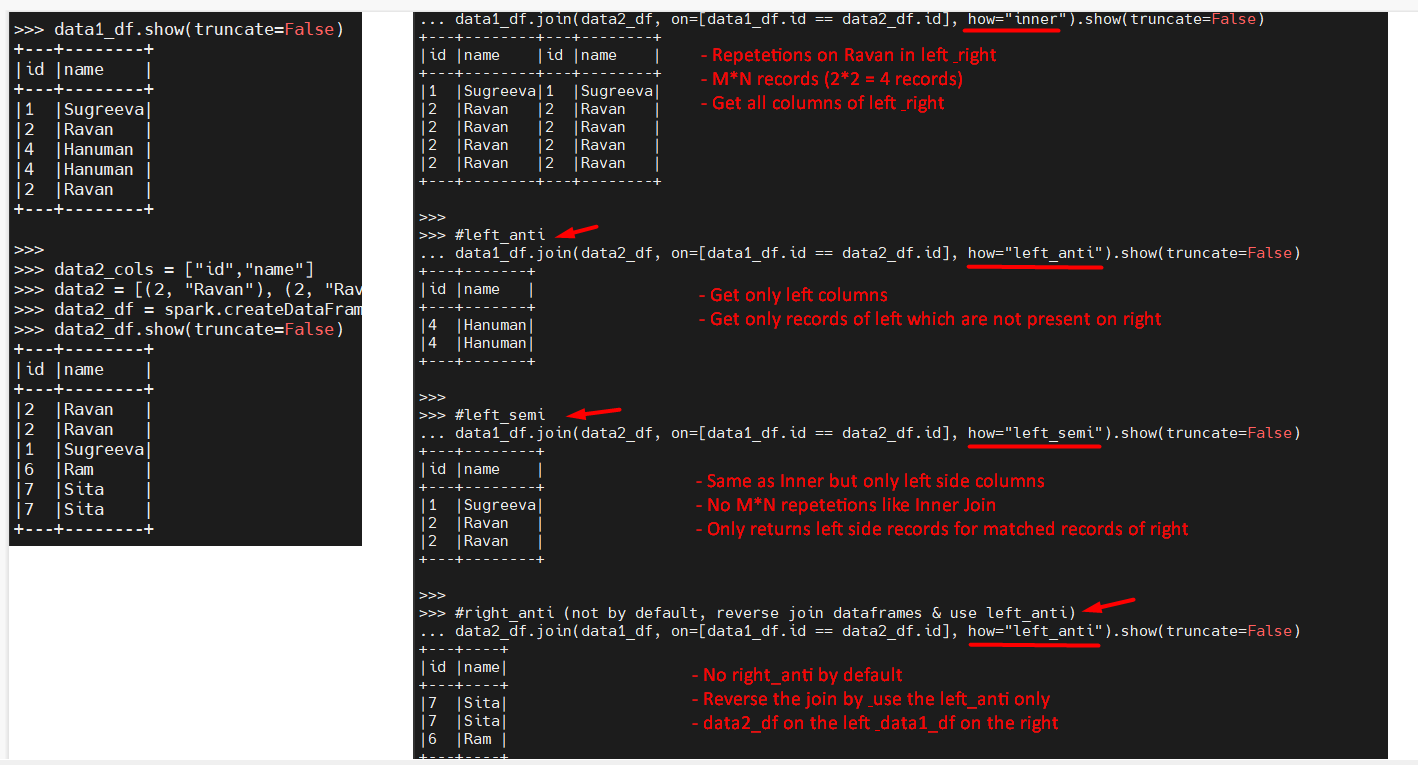
Pyspark Joins

data1_cols = ["id","name"]

data1 = [(1, "Sugreeva"), (2, "Ravan"), (4, "Hanuman"), (4, "Hanuman"), (2, "Ravan")]

data1_df = spark.createDataFrame(data = data1, schema = data1_cols)

data1_df.show(truncate=False)

+---+--------+
| id| name|
+---+--------+
| 1|Sugreeva|
| 2| Ravan|
| 4| Hanuman|
| 4| Hanuman|
| 2| Ravan|
+---+--------+

data2_cols = ["id","name"]

data2 = [(2, "Ravan"), (2, "Ravan"), (1, "Sugreeva"), (6, "Ram"), (7, "Sita"), (7, "Sita")]

data2_df = spark.createDataFrame(data = data2, schema = data2_cols)

data2_df.show(truncate=False)

+---+--------+
| id| name|
+---+--------+
| 2| Ravan|
| 2| Ravan|
| 1|Sugreeva|
| 6| Ram|
| 7| Sita|
| 7| Sita|
+---+--------+

#inner (M*N if any duplicates)

data1_df.join(data2_df, on=[data1_df.id == data2_df.id], how="inner").show(truncate=False)

+---+--------+---+--------+
|id |name |id |name |
+---+--------+---+--------+
|1 |Sugreeva|1 |Sugreeva|
|2 |Ravan |2 |Ravan |
|2 |Ravan |2 |Ravan |
|2 |Ravan |2 |Ravan |
|2 |Ravan |2 |Ravan |
+---+--------+---+--------+
#left join (M*N if any duplicates)

data1_df.join(data2_df, on=[data1_df.id == data2_df.id], how="left").show(truncate=False)

+---+--------+----+--------+
|id |name |id |name |
+---+--------+----+--------+
|1 |Sugreeva|1 |Sugreeva|
|2 |Ravan |2 |Ravan |
|2 |Ravan |2 |Ravan |
|2 |Ravan |2 |Ravan |
|2 |Ravan |2 |Ravan |
|4 |Hanuman |null|null |
|4 |Hanuman |null|null |
+---+--------+----+--------+

#right join (M*N if any duplicates)

data1_df.join(data2_df, on=[data1_df.id == data2_df.id], how="right").show(truncate=False)

+----+--------+---+--------+
|id |name |id |name |
+----+--------+---+--------+
|null|null |7 |Sita |
|null|null |7 |Sita |
|null|null |6 |Ram |
|1 |Sugreeva|1 |Sugreeva|
|2 |Ravan |2 |Ravan |
|2 |Ravan |2 |Ravan |
|2 |Ravan |2 |Ravan |
|2 |Ravan |2 |Ravan |
+----+--------+---+--------+

#left_anti

data1_df.join(data2_df, on=[data1_df.id == data2_df.id], how="left_anti").show(truncate=False)

+---+-------+
|id |name |
+---+-------+
|4 |Hanuman|
|4 |Hanuman|
+---+-------+

#left_semi

data1_df.join(data2_df, on=[data1_df.id == data2_df.id], how="left_semi").show(truncate=False)

+---+--------+
|id |name |
+---+--------+
|1 |Sugreeva|
|2 |Ravan |
|2 |Ravan |
+---+--------+

#right_anti (not by default, reverse join dataframes & use left_anti)

data2_df.join(data1_df, on=[data1_df.id == data2_df.id], how="left_anti").show(truncate=False)

+---+----+
|id |name|
+---+----+
|7 |Sita|
|7 |Sita|
|6 |Ram |
+---+----+


Apr 5, 2023

pyspark join condition (2 types)

 columns1 = ["emp_id","emp_name","emp_city","emp_salary"]

data1 = [
(1, "John", "Sydney", 35000.00),
(2, "Peter", "Melbourne", 45000.00),
(3, "Sam", "Sydney", 55000.00)]
emp_df = spark.createDataFrame(data = data1, schema = columns1)
emp_df.show(truncate=False)
emp_df.printSchema()

data2 = [
(2, "Peter", "Melbourne", 55000.00),
(5, "Jessie", "Brisbane", 42000.00)]
emp_delta_df = spark.createDataFrame(data = data2, schema = columns1)
emp_delta_df.show(truncate=False)
emp_delta_df.printSchema()

# emp_id from emp_delta_df not shown
print('### emp_id from emp_delta_df not shown')
emp_df.join(emp_delta_df, "emp_id", "inner").show()

# emp_id is shown from both dataframes
print('### emp_id is repeated from both dataframes')
emp_df.join(emp_delta_df, emp_df.emp_id == emp_delta_df.emp_id, "inner").show()
### emp_id from emp_delta_df not shown
+------+--------+---------+----------+--------+---------+----------+
|emp_id|emp_name| emp_city|emp_salary|emp_name| emp_city|emp_salary|
+------+--------+---------+----------+--------+---------+----------+
|     2|   Peter|Melbourne|   45000.0|   Peter|Melbourne|   55000.0|
+------+--------+---------+----------+--------+---------+----------+

### emp_id is repeated from both dataframes
+------+--------+---------+----------+------+--------+---------+----------+
|emp_id|emp_name| emp_city|emp_salary|emp_id|emp_name| emp_city|emp_salary|
+------+--------+---------+----------+------+--------+---------+----------+
|     2|   Peter|Melbourne|   45000.0|     2|   Peter|Melbourne|   55000.0|
+------+--------+---------+----------+------+--------+---------+----------+